Mathella: A Dazzling Script Font for Web Design
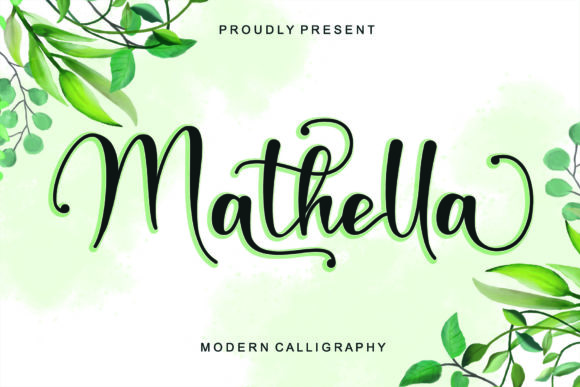
Mathella is a premium script font that stands out with its meticulously crafted and highly detailed design. As a web designer, I've found Mathella to be an excellent choice for adding a touch of elegance and creativity to various digital projects. This font is not just visually appealing; it's also PUA encoded, making it easy to access all glyphs and swashes, which is a significant advantage for designers looking to add unique elements to their work.
Visual Characteristics and Personality
Mathella exudes a sense of sophistication and flair, making it perfect for brands that want to convey a creative and modern image. The fluid, cursive style of the font gives it a handwritten feel, yet it remains clean and professional. This balance makes Mathella a versatile choice for both formal and casual web designs.
Using Mathella in Web Design
When it comes to integrating Mathella into web design, the possibilities are vast. Here are some practical ways to use this font:
- Website Headers and Hero Sections: Mathella can make a bold statement in headers and hero sections, drawing the user's attention immediately. Its elegant curves and flowing lines create a memorable first impression.
- Landing Pages and Call-to-Action Areas: For landing pages, Mathella can be used in call-to-action (CTA) buttons and headlines to add a touch of personality and urgency. It helps in creating a more engaging and conversion-focused layout.
- Online Shop Banners and Product Descriptions: In e-commerce, Mathella can elevate the look of banners and product descriptions, making your online store stand out. It adds a premium feel to the shopping experience, enhancing brand perception.
- Blog Graphics and Digital Ads: For bloggers and content creators, Mathella can be used in blog headers, infographics, and digital ads. Its unique style helps in creating visually appealing and shareable content.
Readability and Visual Hierarchy
While Mathella is a decorative font, it's important to consider readability, especially on mobile screens and responsive layouts. Here are some tips to ensure Mathella enhances rather than detracts from the reading experience:
- Use Mathella Sparingly: Reserve Mathella for headings, logos, and short phrases. For longer text, pair it with a simple sans serif or serif font to maintain readability.
- Font Sizing and Spacing: Use larger font sizes for Mathella to ensure legibility. Adjust line spacing and letter spacing to improve readability, especially on smaller screens.
- Background Considerations: Mathella works well on both light and dark backgrounds. For image overlays, ensure there is enough contrast between the text and the background to keep the text clear and readable.
Font Pairing for a Cohesive Look
To create a balanced and professional design, consider pairing Mathella with complementary fonts. Here are some effective combinations:
- Sans Serif Fonts: Pair Mathella with a clean, simple sans serif like Arial or Helvetica for body text. This combination provides a good mix of elegance and readability.
- Serif Fonts: For a more editorial and traditional look, pair Mathella with a classic serif font like Times New Roman or Georgia. This can give your design a refined and sophisticated feel.
Practical Considerations
Before using Mathella in your projects, here are a few practical considerations:
- Included Styles and File Formats: Check the available styles and file formats (e.e., .ttf, .otf) to ensure compatibility with your design tools and platforms.
- Webfont Availability: If you plan to use Mathella on a website, make sure it is available as a webfont. This ensures optimal performance and loading times.
- Commercial Licensing: Verify the licensing terms for commercial use. Ensure that you have the right to use Mathella in client projects, online stores, and other commercial applications.
Mathella is a versatile and visually stunning script font that can significantly enhance the aesthetic and professionalism of your web design projects. By using it thoughtfully and considering its impact on readability and visual hierarchy, you can create a memorable and engaging user experience.